Following our review of the global
HTC One model, BGR takes an in-depth look at AT&T's version of the
flagship smartphone that may save HTC.
With smartphones, as with any
category of consumer electronics, we have no choice but to accept
compromises. This has been the case throughout the history of cell
phones and it continues to hold true even with best handsets on the
market today. Apple’s (AAPL)
iPhone 5 features a class-leading design with fast, smooth software,
but it has a comparatively small display and lacks some of the great new
functionality we’ve seen introduced on other platforms in recent years.
The Samsung (005930) Galaxy S III is a sleek handset with a stunning screen and a great feature set, but it feels like a cheap toy, as does its successor. Nokia’s (NOK)
Lumia 920 packs plenty of punch in a sleek package, but it’s thick and
heavy, and it is missing a boatload of top apps. It’s inevitable — some
level of compromise is inherent in all smartphones..


BGR reviewed the international version of HTC’s (2498) upcoming flagship smartphone late last month. We loved it. Other early reviewers concurred; the HTC One received critical acclaim across the board.
While HTC’s success with the
upcoming HTC One is anything but certain considering the stiff
competition and massive marketing budgets HTC faces from rivals like
Apple and Samsung, there’s a reason this new phone has been adored so
widely by early reviewers. It’s not just the impeccable design. It’s not
just the sleek unibody aluminum case. It’s not just the fantastic
construction. It’s not just the dramatically improved Sense software
suite. It’s not just the great features baked into Android 4.1.2 Jelly
Bean. It’s something more than all that.
The HTC One is the closest thing we have ever seen to a no-compromise smartphone.

It this regard, the HTC One changes
everything we have come to accept with smartphones, and with consumer
electronics in general. You don’t have to have a cheap-feeling plastic
phone like the Galaxy S III to also have a big, beautiful
high-definition display. You don’t have to live without innovative
features like Google Now or deal with a comparatively tiny screen to
have a gorgeous piece of hardware like the iPhone 5. You don’t have to
carry a huge, clunky handset like the Lumia 920 to enjoy a fresh user
interface that positions real-time content updates at the forefront.
With the HTC One, you can have
Apple-quality hardware, a Samsung-quality display, one of the most
refined versions of Android in the world and an all-around outstanding
user experience all rolled up into one single smartphone. HTC might have
launched the One X+, One X, One S and other One-branded smartphones
last year, but this is the first handset truly worthy of the “One”
moniker.
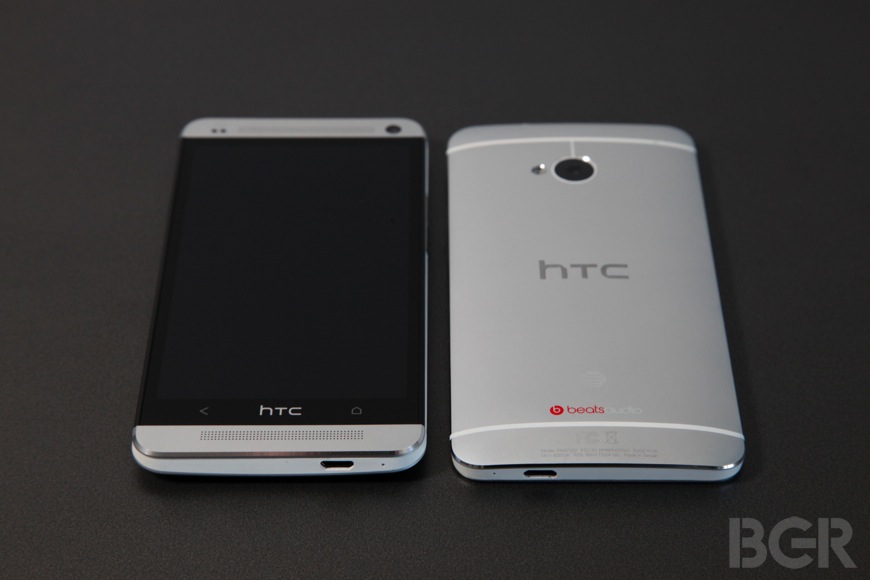
I have been carrying the global 3G version of the HTC One for more than two weeks and now I’ve had the AT&T (T) version, the subject of this review, for the past few days. (AT&T’s version of the HTC One launches on April 19th starting at $199.99.)
First and foremost, the HTC One is a masterpiece in terms of design as well as fit and finish.
HTC has once again built a sleek and
sturdy unibody aluminum case to house its new flagship phone. A plastic
insert runs around the perimeter of the handset and holds things like
the microUSB charging port, volume rocker, audio jack and power button.
The face of the phone consists of a large sheet of Gorilla Glass that
spills over the sides and maintains the lines created by the polished
chamfered bezel. The aluminum enclosure extends above and below the
glass on the front of the handset to cover the “BoomSound” speakers,
sensors and a front-facing camera.
The back of the case on the HTC One
is convex aluminum that houses a camera, an LED flash, a secondary
microphone for noise cancellation, and branding.
The end result is a device that is
remarkably sleek and comfortable to hold despite being quite large at
137.4 x 68.2 x 9.3 millimeters. The 9.3-millimeter dimension is
deceiving though, because the sides of the phone taper in. The One is
much thinner at its edges than it is at its center and doesn’t feel
thick at all while being held.

It should be noted that despite
having a name that HTC executives should be embarrassed ever made it to
the short list of possibilities, “BoomSound” is quite fantastic. No
other smartphone even approaches the sound quality achieved by the One’s
speakers, integrated amplifiers and Beats Audio tuning. Seriously — if
BoomSound is a 10 on a scale of 1 to 10, the next closest smartphone
might rate a 3 or a 4.
Though it has the added benefit of
fantastic sound quality on voice calls (call audio plays through one of
the phone’s main speakers but at a much lower volume, of course) the
BoomSound feature is really only good for people who watch videos or
listen to music on their smartphones without headphones. I do neither on
a regular basis, so BoomSound doesn’t matter much to me personally. The
Beats audio tuning on sound delivered to connected headphones is far
more important to me and thankfully, it’s just as impressive as it has
been on earlier HTC smartphones.
The display on the HTC One is
another big check in the plus column. This full HD 1080p display is
absolutely gorgeous. Though it’s only one factor among many that make
the One’s display so good, the pixel density on this panel tops both the
iPhone 5 (326 ppi) and the Galaxy S4 (441 ppi) at 468 pixels per inch.
Images and text are both very crisp
and sharp on the 4.7-inch screen, and the contrast is more than
adequate. I find that colors aren’t quite as vivid as they are on the
Galaxy S4 or iPhone 5, but the result is actually a bit more natural
looking to my eye — colors on the Galaxy S4 are so vibrant that they
seem exaggerated, and this is the case to a lesser degree on the iPhone 5
as well.

Moving from the sleek exterior and
impressive display to the software, HTC Sense and its new bells and
whistles will likely still be polarizing. Purists will complain that
Sense detracts from the Android experience while HTC fans will argue
that Sense enhances it. As is often the case, reality lies somewhere in
the middle.
The latest version of Sense is the
most refined iteration yet, and it could potentially sway a number of
users who were unhappy with older versions.
Much of Android fans’ animosity
toward Sense seems to stem from early versions of the software, which
were slow and clunky. This is no longer the case. Advancements in
component technology and improvements to HTC’s code now yield a user
experience that is entirely free of freezing, stuttering and bogging.
Scrolling is smooth, apps refresh with new data quickly and the look of
the interface is much cleaner and more intuitive than it has been in the
past.
A few things about HTC’s software that I find particularly impressive:
The user interface:
I have always liked the Sense interface to an extent, and I have found
that it gets better with each new iteration. In its latest form, Sense
is much less cumbersome than it has ever been, though it still comes
together as a significant overhaul to the Android UI. I find many
aspects of Sense to be improvements over stock Android and clean,
gorgeous widgets continue to take center stage.

In terms of apps and software
tweaks, HTC’s additions are hit or miss. I consider HTC’s latest email
app to be among the best there is, for example, and there are other
HTC-built apps I enjoy as well. But on the flip side, there are still
some things that are terribly annoying.
A quick example: to create an app
shortcut on a home screen, you now must long-tap on an icon in the app
menu until it detaches, drag it all the way up to the top left corner
and hover over the “shortcut” indicator, and then without letting go,
you have to drag it back down and move side to side between home screens
until you find the spot you want. This is a huge step backwards
compared to Android’s stock behavior and there are a number of similar
idiosyncracies in Sense.
BlinkFeed:
HTC’s “BlinkFeed” is an active home screen that aggregates content from
as many as 1,400 different providers. It also mixes in content from
social networks like Facebook, Twitter and LinkedIn. Updates can be
downloaded automatically on a set schedule or BlinkFeed can be refreshed
manually, and the design is very clean and slick.

BlinkFeed is a great feature for
people who always want to stay connected, and HTC’s implementation is
impressive. But it’s not for everyone. For people like me who don’t want
to be bothered with social network updates or news on their home
screens, you can set up normal HTC/Android home screens that are packed
with as many standard app icons and widgets as you want. Then BlinkFeed
only comes into play when you swipe over to the left-most home screen.
HTC TV: HTC’s TV app is without question one of my favorite features on the HTC One.
Powered by personalized TV guide
provider Peel, HTC TV is a cross between an interactive channel guide
and a universal remote control. Shows and movies are represented by
thumbnails and simply tapping on the thumbnail of a program lets you set
a reminder to watch it once it comes on. If you tap on a show or movie
that is currently airing, the One will tune your cable or satellite box
to the appropriate channel.
How is that possible? The One’s
power button is also an IR blaster capable of controlling any home
entertainment device — TVs, receivers, Blu-ray players, DVD players,
cable boxes, satellite boxes, DVRs and even these weird old things
called VCRs. If it uses a standard IR remote, the One can control it.

HTC TV also lets users mark shows
and movies as favorites so they’ll appear at the top of the list any
time they’re airing or coming up. This is a great feature, but I wish I
could also hide shows I don’t like. I’m sure there are plenty of people
out there who enjoy “Cougar Town” and “Say Yes to the Dress,” but I’m
not one of them so there’s no reason these shows should appear on my
guide.
The app features a universal remote
function that you set up by room, so you have one set of controls while
watching TV in your living room and another set while watching in your
bedroom. And since having to unlock your phone every time you want to
change the channel would be a pain, the One can be set to automatically
illuminate the display every time you pick it up when the HTC TV app is
left open.
This is a huge step toward achieving
what the modern TV-watching experience should be. I shouldn’t have to
flip around or scroll through an endless sequential channel guide to see
what’s on. The device I use to control my TV should know what shows and
movies I like, show them to me in a logical way with a beautiful UI,
and help me discover great new content. HTC and Peel don’t really have
the discovery part down yet on the One, but I have a feeling they’ll get
there soon enough.
Similar solutions are currently
available on some tablets, but having this app on a smartphone that
users carry with them at all times is far more convenient.

Of course, the HTC One certainly
isn’t perfect — though finding faults isn’t as easy with the One as it
is with most other phones.
For one thing, this is a big phone.
For some, it will be too big. For others, it will be fine. I personally
fall somewhere in the middle.
The One is a bit larger than I would
like it to be, but the size isn’t a deal breaker for me. The display
size means the phone borders on “phablet” territory, depending on your
definition — market research firm ABI defines a phablet as a smartphone with a display that measures between 4.6 and 5.5 inches diagonally — but it’s far more manageable than phones like the Galaxy Note II.
Until we start to see handsets with
true edge to edge displays, my ideal screen size is about 4.3 inches.
This size lets users with average sized hands operate the phone
comfortably with one hand, but it also provides plenty of canvas for
apps, images and videos. Handsets like the One with bigger displays will
require fumbling and awkward stretching for most people when being used
with one hand.

Battery life is good but it could be
even better with more thorough power controls. The One has a “Sleep
Mode” function that automatically turns off the device’s data connection
during “long periods of inactivity,” but a more comprehensive solution
like Motorola’s Smart Settingsfeature would offer additional battery life benefits.
I would also like to see HTC
introduce other features available in something like Smart Settings.
Automatic time-based and location-based triggers can be added using
third-party apps, but their utility and user experience would be
dramatically improved with tighter OS integration.
In my time with the One, I found
that I was able to go a full day between charges with no problem on the
global 3G model, with average and even borderline-heavy use. A typical
day might include obscene amounts of email, constant checking of Twitter
and Google Reader, some voice calling, some navigation, some music
streaming, some web browsing and an hour or so spent with HTC TV.

I can’t say much about the battery
performance of the AT&T model with LTE yet, because HTC only
delivered units to reviewers last Thursday (four days ago). In that
short time span though, I haven’t noticed much of a hit compared to the
global model. Expect to charge it once each day unless you’re streaming
video over LTE for long periods of time or performing other heavy tasks
like playing games.
I can say, though, that any hit the
phone takes in terms of battery life is certainly worth it — I was
hurting without AT&T’s LTE service, which in my area averages around
17Mbps to 20Mbps down and 13Mbps to 15Mbps up.

The HTC One’s camera is very interesting.
HTC decided to stop fighting the
megapixel war and introduce new “UltraPixel” technology that the company
claims produces higher quality images despite fewer megapixels (4
megapixels, to be precise). You can read all the marketing verbiage and
technical jargon on HTC’s site. In practice, I found that photos captured with the One are good, but not great.
Low-light performance outshines most
competitors, without question. HTC’s optics let in more light and the
result is better pictures in dark environments. But I found that photos
captured in normal lighting conditions were not as clear and sharp as
they are with other leading camera phones like the Lumia 920 or the
iPhone 5. In fact, I think the photo clarity might be a bit better on
previous-generation HTC phones like the One X+.
The camera software is quite
impressive though, packed full of features but easy to navigate. There
are also some added bonuses, such as the ability to quickly capture a
series of sequential photos and choose the best one, built-in filters a
la Instagram, a function that can eliminate unwanted items from photos
after they are taken, and HTC Zoe.
HTC Zoe is a bit of a gimmick but
it’s very impressive before the novelty wears off. In the few weeks I’ve
had the One, every single person I’ve shown this feature to has been
wowed.
Zoe takes various photos and videos
shot while the feature is enabled and combines them automatically into a
movie complete with a musical score. These movies are created almost
instantly without any intervention from the user, though they can be
edited manually if, for example, he or she wants to change the music or
make other edits.

When it comes to Android, apps are still a big barrier for me and this remains true with the One.
I almost always carry an Android
phone with me these days, but the iPhone is still my primary handset for
both personal use and for work. There are a number of reasons I use an
iPhone and apps sit somewhere near the top of my list.
Apart from proprietary apps and
services like iMessage, which I use to communicate with almost all of my
friends and family, most of the apps I rely on regularly are now
available on the Android platform. Apps that aren’t, such as TweetBot
and Reeder, have comparable Android alternatives. But I find that even
the best apps available for Android aren’t as smooth and refined as they
are on iOS.
Perhaps Android developers are given too many liberties and too few guidelines or perhaps Google’s (GOOG)
SDK is somehow limiting. I can’t say. What I can say is that well-made
iOS apps always seem to outshine their Android counterparts and provide
an all-around smoother and cleaner user experience.

TweetBot, the iOS Twitter client I mentioned earlier, is a great example. I use a fantastic Twitter client called Falcon Pro on
Android devices and I can’t say enough good things about it. It’s well
designed, the interface makes great use of panels, it has great Twitter
list support (which is very important to me), and it’s reasonably fast.
But TweetBot has an even better UI, lists are even more accessible, and
it’s much faster and smoother than Falcon Pro. Unfortunately, this is
all too common when comparing similar apps on the two platforms.
Another example mentioned earlier
was Reeder, an iOS app I use for mobile access to Google Reader. I have
tried a dozen RSS readers for Android and landed on an app called gReader that
I very much enjoy. As great as it is, however, its user interface
nowhere near as clean as Reeder, performance isn’t as smooth, and it has
eight pages of settings that are beyond overcomplicated.
I’m confident that this will change
over time. But right now, it’s an unavoidable issue for those who seek
the smoothest possible user experience.
And speaking of apps, it should be
noted that AT&T’s version of the One ships with a bunch of standard
AT&T Android apps many would consider bloatware. It took me all of
15 seconds to stuff them all into a folder never to be seen again, and
the base One model includes 32GB of storage so there’s plenty of room
left for apps, videos, images and other data.
Lastly, I’m not sure who decided to
put the power/lock button on the left side of the handset instead of the
right side, but I sincerely wish he or she hadn’t. It makes locking the
screen impossible with one hand (unless you’re left handed) and it is
incredibly annoying (unless you’re left handed).

The HTC One comes at a time when HTC desperately needs a hit. Very, very desperately. The
company’s market share and performance continue to slide as Apple and
Samsung dominate the smartphone market, and Samsung’s next-generation
flagship phone is about to launch globally with support from carriers in
155 countries and billions of marketing dollars.
HTC doesn’t have billions to dump
into marketing. It also doesn’t have the momentum the Samsung has,
coming off a worldwide smash in the Galaxy S III. What HTC does have,
however, is one of the best smartphones the world has ever seen.
The One combines an impeccable
design, a sleek aluminum body, sturdy construction, well-made software
and a handful of innovative features into a single package that is
class-leading in almost every regard. The fit and finish are outstanding
and the latest version of Sense is elegant and smooth. And just to help
illustrate just how sturdy this phone’s build really is, I dropped it
twice so far while it has been in my possession. The first time it
slipped out of my hand and tumbled down a flight of carpeted stairs onto
my hardwood living room floor. The second spill saw the phone slide out
of a sweater pocket and fall glass-first onto the tile floor in my
kitchen, resulting in one of the loudest, scariest sounds I have even
heard a gadget make. The One emerged from both spills without a scratch.

A single smartphone is not going to reverse HTC’s fortunes. The competition is too fierce and HTC’s current slump is far too severe.
But with the right combination of marketing, significant carrier
support and a little luck, the One could very well be a turning point
for HTC.
With the Galaxy S4, Galaxy Note III, Google’s “X Phone,”
new RAZR handsets, a new flagship Optimus G and plenty more due to
launch this year, competition at the high end of the smartphone market
will be more fierce than ever before. But unless something truly
unexpected pops up, the HTC One will almost certainly be the best
all-around Android phone to launch in 2013. The One includes all of the
features that make a hit and none of the big compromises we’re typically
forced to accept, and in that regard it changes everything.


No comments:
Post a Comment