Dell’s Inspiron 14
7000-series laptops are sexy-looking beasts boasting forged-aluminum,
beveled-edge chasses; 14-inch Gorilla Glass touchscreens; and backlit
keyboards. But the absence of an SSD (as a cache or otherwise) has a
significant impact on their performance.
These machines look like Ultrabooks, but they're not being marketed
as such. Intel controls that standard and while it doesn’t explicitly
state that a notebook must be equipped with an SSD to carry the
Ultrabook moniker, the Ultrabook definition requires a notebook to
operate in standby for at least seven days, and awake from standby with
fresh data in less than three seconds. The Inspiron 14 7000 series (I
reviewed the Model 7437) can’t do that with a mechanical hard drive, and
it can’t be configured with one at time of purchase. ROBERT CARDIN
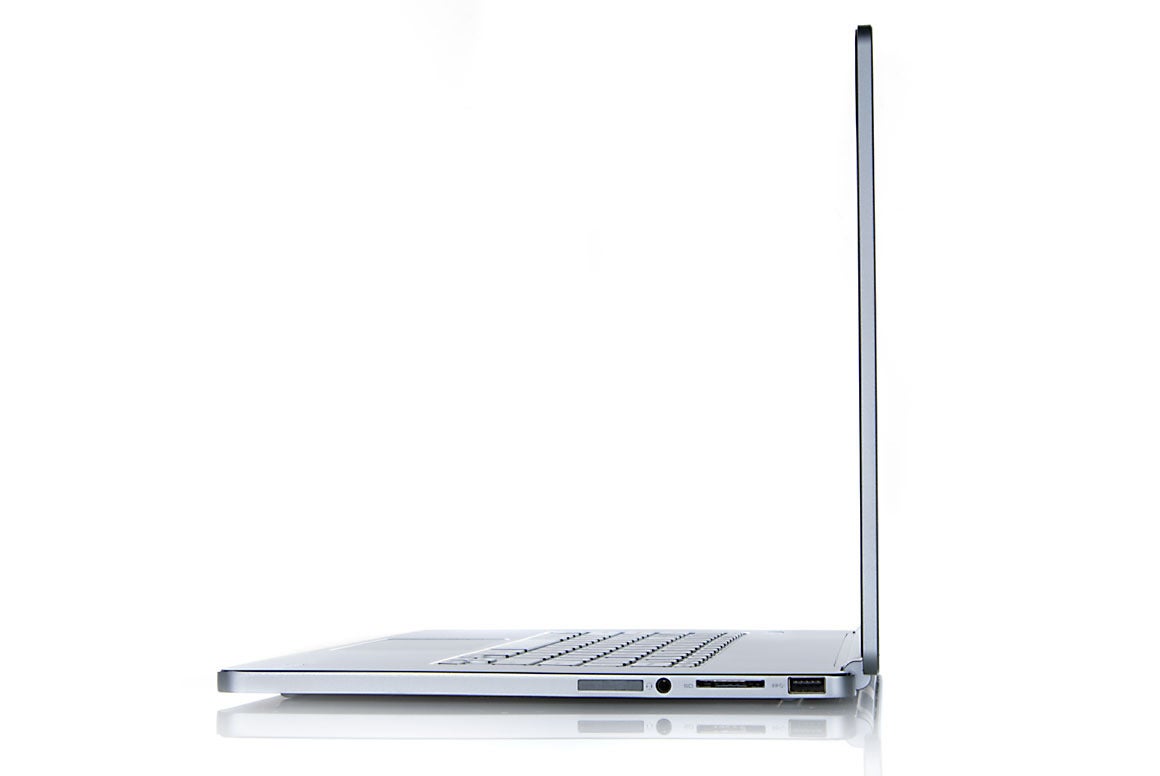
Dell's Inspiron 14 7000 series cuts a super-thin profile despite its reliance on a mechanical hard drive.
Apart from the absence of an SSD, this $850 laptop has a number of
good components under the hood, including a fourth-generation Intel Core
i5-4200U processor and 6GB of DDR3/1600 memory. But its 500GB
mechanical hard drive spins its platters at only 5400 rpm, and its Intel
Dual Band Wireless-N 7260 Wi-Fi adapter can connect only to 802.11n
networks at a maximum physical link rate of 300 mbps. You’ll need a USB adapter if you want to network at 802.11ac speeds.
The Inspiron 14 produced a generally unimpressive Worldbench 8.1
score of 132. That renders Dell’s machine 32 percent faster than the
Asus VivoBook S550CA that we’ve been using as a reference point, but
leaves it far behind the consumer-oriented Lenovo Flex 14 (which has an
SSD) and slightly behind the business-oriented Toshiba Tecra Z40 (which
has a 7200 rpm mechanical drive).
There's no escaping the benchmark hit that a mechanical hard drive causes.
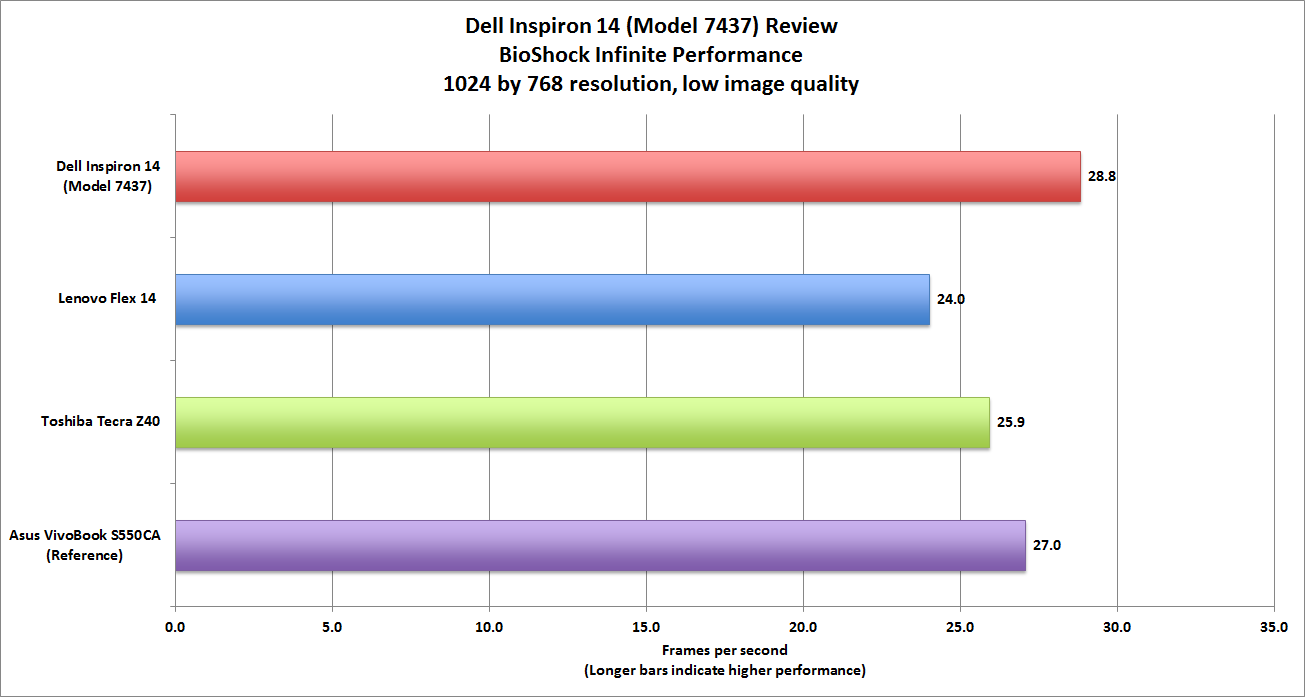
Looking at gaming performance—specifically, BioShock Infinite at
resolution of 1024 by 768 with low visual quality—the Inspiron 14
slightly outperformed the Lenovo and the Toshiba, even though all three
machines rely on the same integrated graphics processor (Intel HD
Graphics 4400). It’s no gaming powerhouse, but it’s fine for
less-demanding games like World of Warcraft.
The Inspiron’s 14-inch touchscreen is bright, beautiful, and clear,
with excellent color accuracy, deep blacks, and crisp text and images.
HD video looks very good on the Inspiron’s display, too. I noticed just a
few artifacts in high-motion scenes. The touchscreen is smoothly
responsive to multi-touch gestures, and the edge-to-edge glass allows
for Windows 8 gestures to be performed quickly and easily.
The Inspiron 14 doesn’t have the most powerful speakers, but they
sound better than most laptop speakers. They’re mounted on either side
of the chassis, and they deliver just the right mix of bass and treble.
Gaming performance is fairly typical for a laptop with a fourth-generation Intel Core processor and integrated graphics.
I did notice some anomalies in the Inspiron 14’s otherwise excellent
industrial design. The chassis is much wider than necessary to
accommodate a 14-inch display, with an unusually wide bezel at the sides
and bottom of the display and more than an inch of dead space on the
left and right sides of the keyboard. The island-style keyboard sits
dead center in the chassis, a placement that renders the wrist rest
cramped and uncomfortable. And why are the top row of function keys so
tiny—they’re less than 0.25 inches tall—when there’s two inches of
unoccupied space right above them?
The keyboard deck itself is flimsy—aggressive keystrokes cause the
whole thing to sink slightly—and the flat keys provide very little
tactile feedback. The aforementioned backlight provides very uneven
illumination, giving the keyboard a marbled look. The touchpad, on the
other hand, is quite good, providing swift, accurate movements and
mostly smooth multi-touch gestures.

 ROBERT CARDIN

 ROBERT CARDIN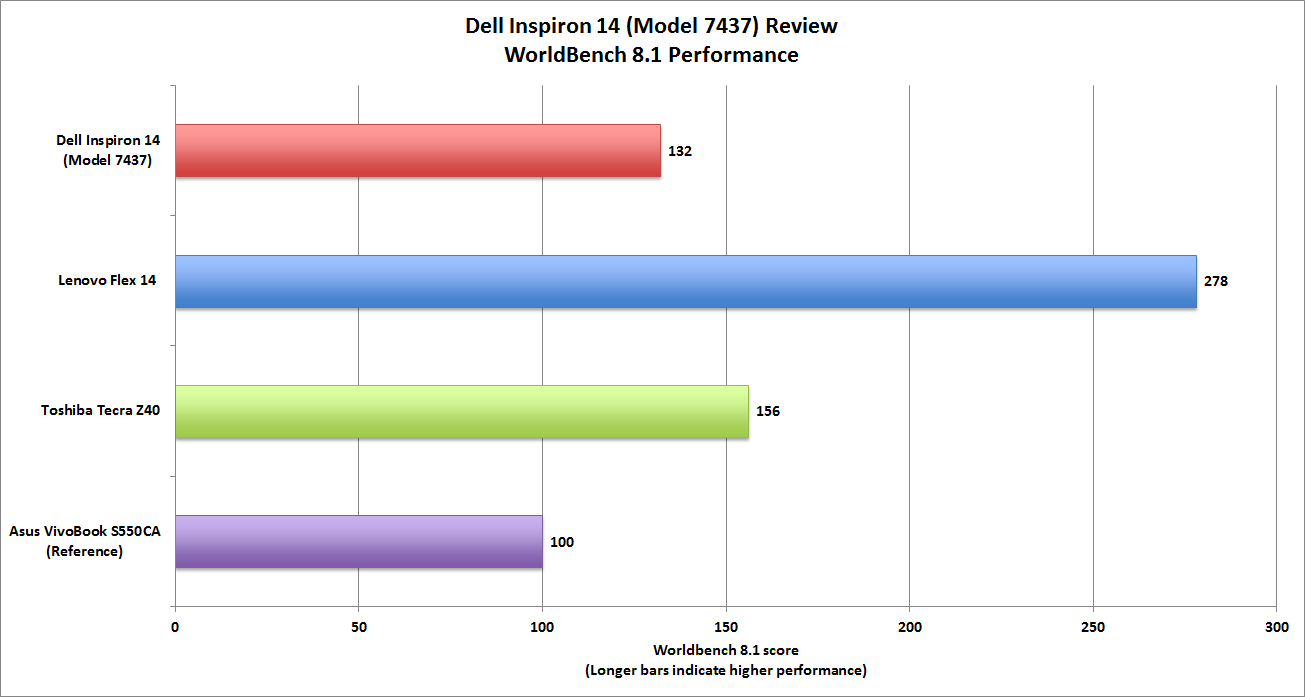


No comments:
Post a Comment